Get Shipment Status via Webhook
How to add webhook on Bosta's Dashboard
Open the Settings from your Business Dashboard.
Go to API Integration.
Click Request OTP and enter the code sent to you.
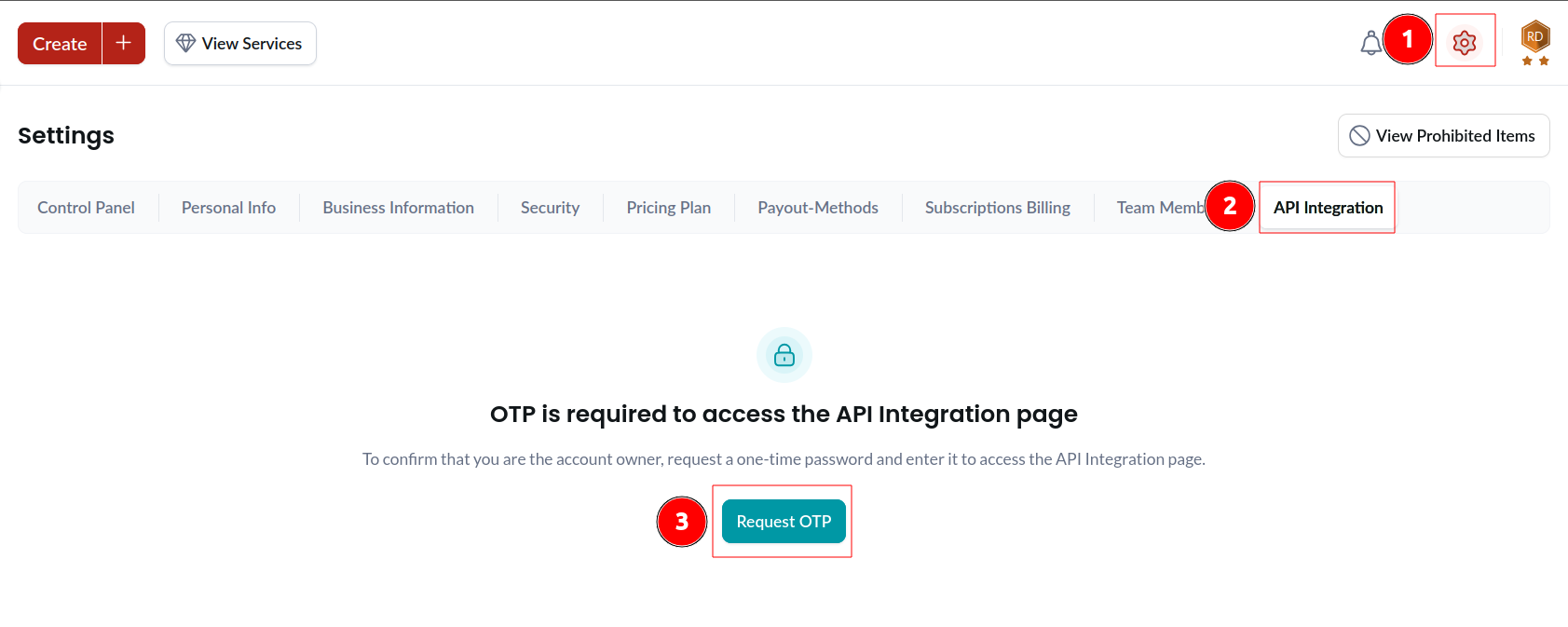
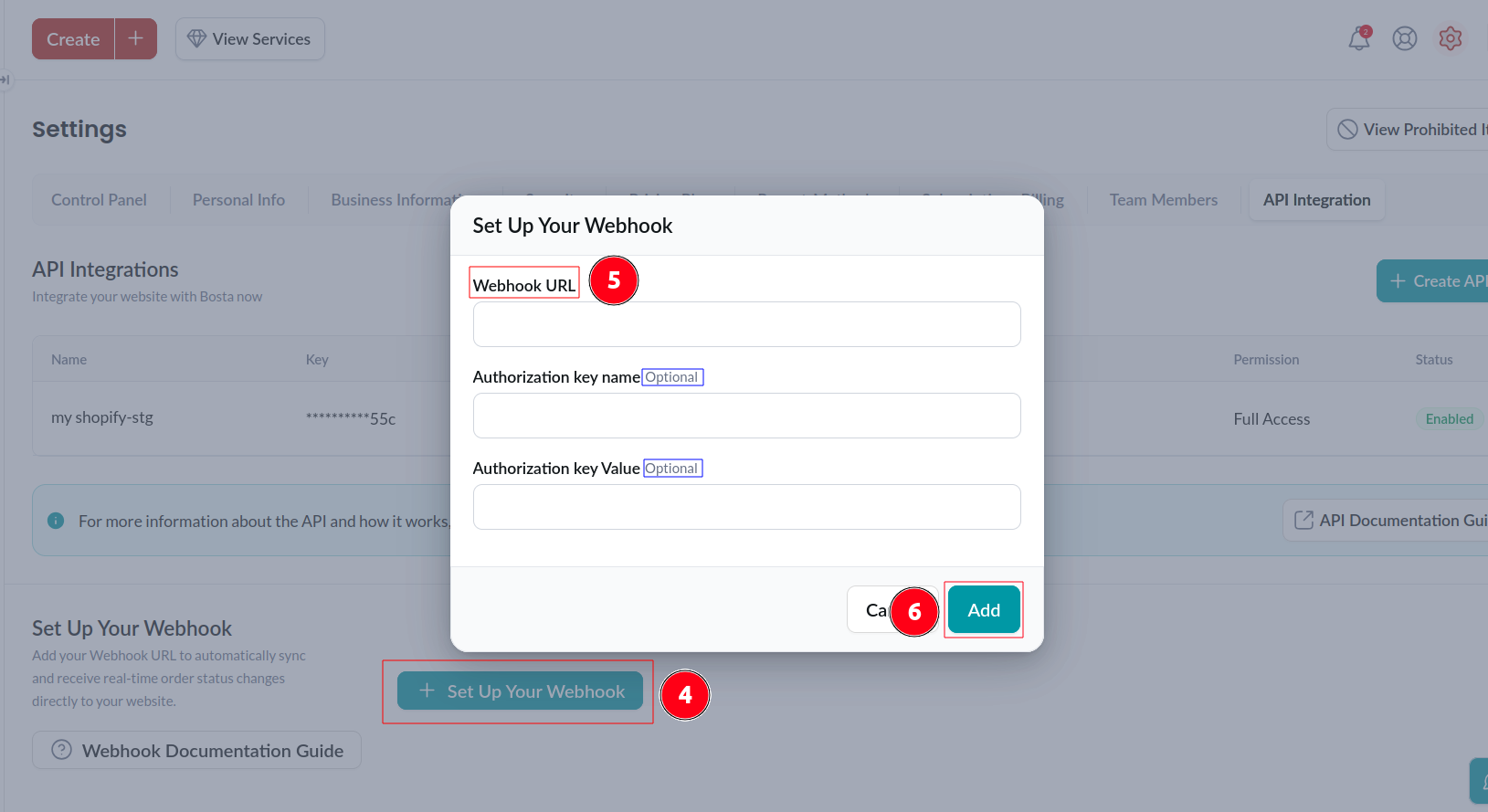
Scroll down to Set Up Your Webhook.
Add your Webhook URL. (mandatory)
You have the option to add an Authorization Key and assign it a custom name.
Notes:
- Your webhook is triggered only when an order status changes, not on order creation.
- Once added to your account, the webhook is securely saved in Bosta’s database, so it does not need to be included in the order creation API request.
How it works
- Bosta webhooks to keep your orders synced with the latest state on our system by sending a request to a specific endpoint that you will provide us with.
- After every change in the state of the order. We will send a POST request to your endpoint with this update
How to use
In case you have not added your webhook to your account through Bosta’s Dashboard using the steps above follow the steps below:
- While creating your order using the following endpoint
/api/v2/deliveries?apiVersion=1you need to set the following parameter in the request body
{
 webhookUrl: "Your endpoint url" // Type String
 webhookCustomHeaders: "any custom headers you want to be send with the request (Not Required)" // Type object
}
Example of the parameters
{
 webhookUrl: "https://YourEndpointUrl"
 webhookCustomHeaders:{
        "Authorization" : "Basic abc123"
    }
}
- After any change in the state you will receive the following request on the endpoint you provide us with:
POSThttps://yourendPointwith the following body
{
  "_id": "The order id",
  "trackingNumber": "The order tracking Number",
  "state": "A code representing the current state of the order",
  "type": "SEND | EXCHANGE | CUSTOMER_RETURN_PICKUP | RTO | SIGN_AND_RETURN | FXF_SEND (fulfillment)",
  "cod": "The amount collected from you customer", // only in Deliverd state,
  "timeStamp": "The timestamp at which the state was changed",
  "isConfirmedDelivery":"Boolean value",// Will be sent as a proof of delivery
  "deliveryPromiseDate":"Date in ('DD-MM-YYYY') format", // e.x 23-02-2023
  "exceptionReason": "Reason (NDR)", // only in Exception state,
  "exceptionCode":"A code representing the exception reason ",// All codes is listed below
  "businessReference": "The businessReference value that was sent in the creation request",
  "numberOfAttempts": "The number of attempts that Bosta made to deliver the shipment to your customer"
}
- The type of the fields in the request body:
| Field | Type |
|---|---|
| _id | String |
| trackingNumber | String |
| state | Number |
| type | String |
| cod | Number |
| timeStamp | Number |
| isConfirmedDelivery | Boolean |
| deliveryPromiseDate | Date |
| exceptionReason | String |
| exceptionCode | Number |
| businessReference | String |
| numberOfAttempts | Number |
- Examples of the request body:
{
  // Example of the data in a normal state change.
  "_id": "15LmfpKYp0YILntA3jbyd",
  "trackingNumber": 48089608,
  "state": 24,
  "type": "SEND",
  "timeStamp": 1689252908261,
  "deliveryPromiseDate": "13-07-2023",
  "numberOfAttempts": 0
}
{
  // Example of the data in a exception case.
  "_id": "15LmfpKYp0YILntA3jbyd",
  "trackingNumber": 48089608,
  "state": 47,
  "type": "SEND",
  "timeStamp": 1689253131024,
  "deliveryPromiseDate": "15-07-2023",
  "numberOfAttempts": 1,
  "exceptionReason": "Postponed - the customer requested postponement for another day.",
  "exceptionCode": 3
}
Bosta States
- The following is a table of the order different states and the code representing it which will be send to you over the webhook request
| State Name | Dashboard State Name | Type | State Code |
|---|---|---|---|
| Pickup requested | New | All (Except Cash Collection) | 10 |
| Waiting for route | In progress | Cash Collection | 11 |
| Route Assigned | In progress | All Types | 20 |
| Picking up from consignee | Heading to customer | CRP, Exchange | 22 |
| Picking up | Heading to customer | Cash Collection | 40 |
| Picked up from business | Picked up | Send, Exchange | 21 |
| Picked up from consignee | Picked up | CRP, Exchange | 23 |
| Picked up | Heading to customer | Send, Fulfillment Send, | 41 |
| Picked up | Heading to you | Exchange, CRP, RTO | 41 |
| Received at warehouse | In progress | All (Except Cash Collection) | 24 |
| Fulfilled | Fulfilled | Fulfillment | 25 |
| In transit between Hubs | In progress | All (Except Cash Collection) | 30 |
| Delivered | Successful | Send, Fulfillment Send, Cash Collection | 45 |
| Returned to business | Successful | Exchange, CRP, RTO | 46 |
| Exception | In progress | All Types | 47 |
| Canceled | In progress | All Types | 49 |
| Terminated | Terminated | All Types | 48 |
| Lost | Unsuccessful | All Types | 100 |
| Damaged | Unsuccessful | All Except (Cash Collection) | 101 |
| Returned to stock | Returned | Fulfillment | 60 |
| Investigation | In progress | All | 102 |
| Awaiting your action | Awaiting your action | Exchange, CRP, RTO | 103 |
| Archived | Archived | All (Except Cash Collection) | 104 |
| On hold | In progress | All (Except Cash Collection) | 105 |
Exception reasons (NDRs)
We can divide our exception reasons into two cases:
Forward Exception: This exception happens when we try to deliver the order to the customer.
Reason name Code Retry delivery - the customer is not in the address. 1 Retry delivery - the customer changed the address. 2 Postponed - the customer requested postponement for another day. 3 Cancellation - the customer wants to open the shipment. 4 Waiting for data modification - address or phone number not clear/wrong. 5 Cancellation - cancellation of delivery at the request of the sender. 6 Customer is not answering. 7 Cancellation - the customer refuses to receive the shipment. 8 Cancellation - the delivery address is outside Bosta coverage area. 12 Waiting for data modification - address not clear. 13 Waiting for data modification - wrong phone number. 14 Bad Weather. 100 Suspicious consignee. 101 Return Exception: This exception happens when we try to deliver the order to the business.
Reason name Code Retry return - Business changed the address. 20 Postponed - Business requested postponement for another day. 21 Waiting for data modification: address or phone number not clear/wrong. 22 Business is not answering. 23 Business refused to receive the shipment. 24 Retry return - Business is not in the address. 25 Bad Weather. 100 Suspicious consignee. 101 The order is damaged. 26 Empty order. 27 The order is incomplete. 28 The order does not belong to the business. 29 The order was opened while it should not. 30
More Info
The following points representing some ambiguous states and when it will be pushed:
- Picking up (Only for Cash Collection): When Bosta star is out to collect the money from the end customer
- Picked up: when Bosta star picks the order from our warehouses to be delivered to its final destination for example:
- when normal order is picked up to be delivered to the end customer
- when a return order is picked up to be returned to your premises
- Terminated: It will be pushed when we fail to pick up your return order or collect your money from the end customer for 3 times. our system will then automatically change the order state to Terminated and push the notification
- Awaiting your action: When Bosta fails to return a shipment for your premises for 3 times due to one of the return exceptions mentioned in the previous email.
The following points represent some states that have different meanings based on the order type:
- Picked up:
- Out for delivery: when the order type is SEND
- Out for return: when the order type is CRP, RTO, EXCHANGE
- Picking up from consignee:
- Out for pickup: when the order type is CRP
- Out for exchange: When the order type is EXCHANGE